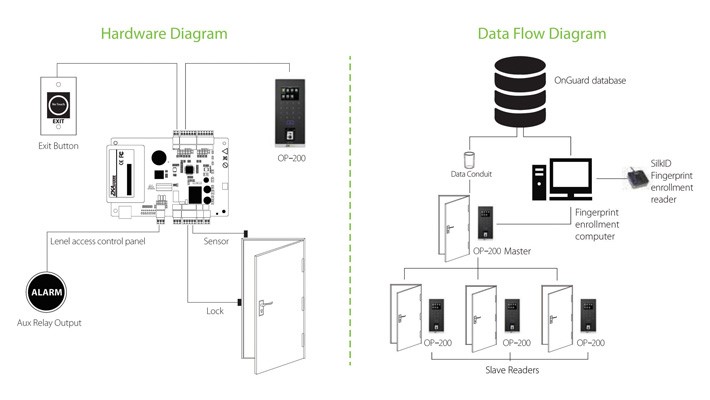
OP-200 is very easy to install and simple to use!
Enroll users’ fingerprints by using the OP-200 master unit’s webserver. The OP-200 master unit then synchronizes those users’ fingerprints and data with the OP-200 slave units.
Installation steps as following:
1. Provide 12V power and network cables near the Master and Slave readers wall mounts.
2. Connect power and network cable to the Master and Slave readers. Make note of the Master reader’s IP address. Configure Slave readers with OP-200 IP address.
3. Install the driver on computer running OnGuard /Symmetry access control software and enter IP address of the Master reader.
4. OnGuard / Symmetry access control software user-data automatically synchronizes with OP-200 Master. After synchronization, enroll fingerprints either directly on the Master reader or on SilkID fingerprint enrollment reader (connected to computer running OnGuard /Symmetry access control software).
5. Installation is complete. OP-200 Master reader will automatically synchronize user data and fingerprint templates amongst OP-200 slave readers whenever changes occur.